Installation
To quickly test OpenL2M in your environment, run in a docker container! Please see ./docker/test/README.txt
The following steps are for a full production install of OpenL2M. No containers are supported for production at this time.
Requirements
We recommend you install OpenL2M on Ubuntu 24.04 or 26.04 LTS
You can also look at testing in a Docker container, see here for more options: https://github.com/openl2m
Note
Ubuntu 26.04 comes with Python 3.14, which is now supported!.
OpenL2M has some requirements:
Python 3.12 - 3.14 (OpenL2M is developed and tested on v3.12 and 3.14.)
net-snmp v5.7 or greater, including net-snmp-devel
the Python “ezsnmp” package v2.3.0
a web server, with the WSGI capability. We use Nginx in all our documentation. Apache or Caddy may work but is not tested.
the Django framework, v6.0 or greater.
a PostgreSQL database, running at least version 15. We use v16 in our testing.
Note: Ubuntu 24.04 comes with Python v3.12 and PostgreSQL v16. Ubuntu 22.04 comes with PostGreSQL v14. Ubuntu 22.04 and 20.04 are no longer supported!
Application Stack Overview
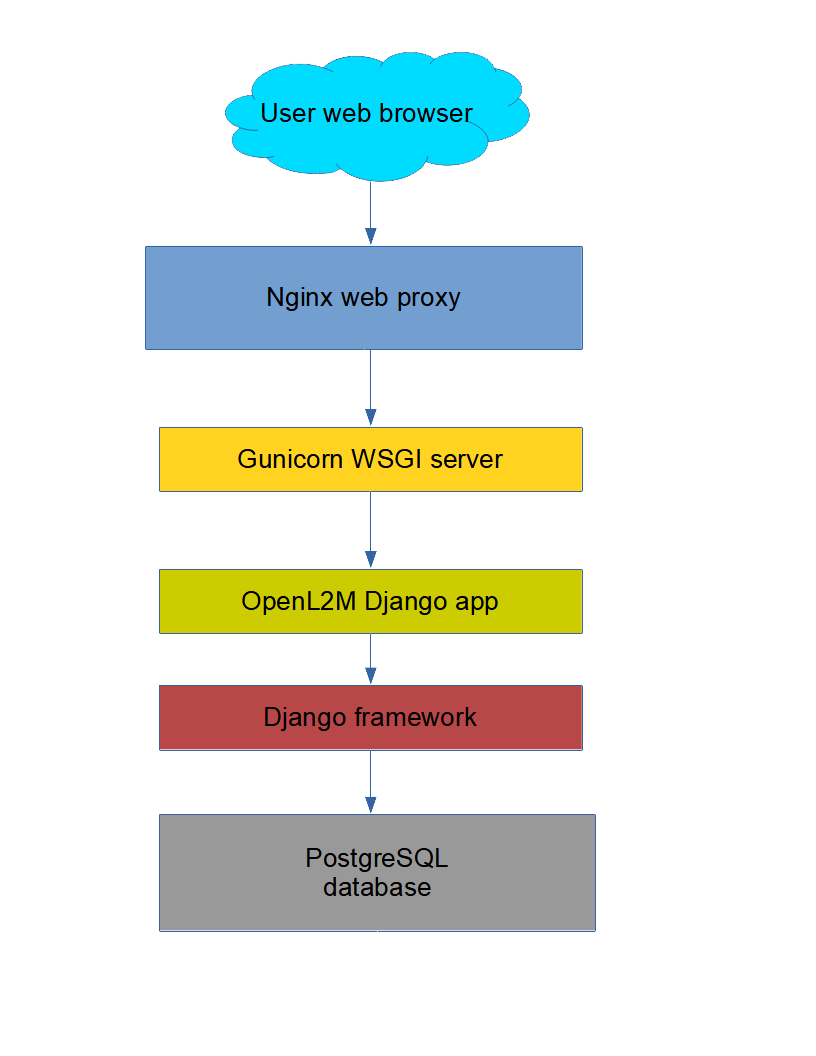
Once installation is complete, you will have the following application stack to get a working OpenL2M application:
Nginx web server (handles user web requests)
Gunicorn WSGI Processes with Python (processes the requests and runs OpenL2M)
PostgreSQL database
At the end of this page is an image showing the application stack.
Installation
OpenL2M is developed and tested in a Ubuntu 24.04 LTS environment. All instructions are related to that. However, this should work just fine on other distributions as long as the requirements are met. (We no longer develop and test on CentOS/Rocky/AlmaLinux environments.)
These are the steps to install OpenL2M:
Application Stack Overview