
The Connector() Object
Switch connections are made via the Connector() class. The Django “views” in switches/views.py instantiate an object derived from this Connector() class.
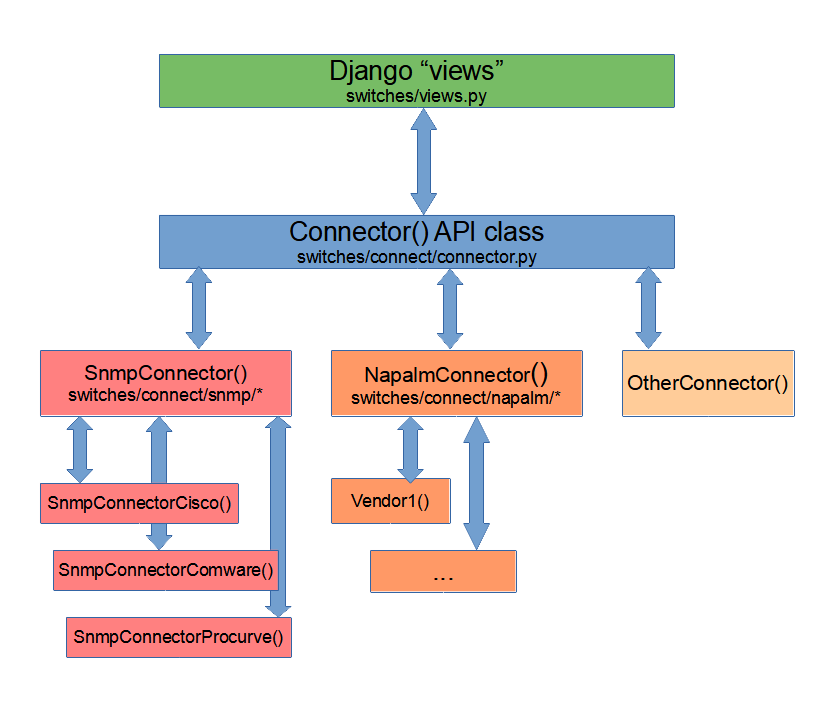
The Connector() API
connect.py
get_connection_object() figures out what specific Connector() class to get for the device. This is based on the Switch() configuration in the admin pages. It returns the proper object. It is called by all ‘views.py’ functions to get an object for the current device/switch.
It should be called as:
try:
      conn = get_connection_object(request, group, switch)
  except Exception:
      # handle exception as needed
connector.py
The Connector() API is defined in switches/connect/connector.py. This Connector() base class is inherited by all device- or vendor-specific connectors.
Data Collection
Collecting data from the device/switch is done by calling these functions:
conn.get_my_basic_info()
conn.get_my_hardware_details()
conn.check_my_device_health()
conn.get_my_client_data()
get_my_basic_info()
This is called when a switch is selected from the menu, and is called from the corresponding Django view. This function should load the necessary information about interfaces to produce the basic switch view.
More especially, this should load:
the connector.vlans{} dictionary with Vlan() objects.
the connector.interfaces{} dictionary with Interface() objects, each one representing an interface on the device.
Note that these supporting classes (objects) are defined in switches/connect/classes.py
A good example is in switches/connect/snmp/connector.py, where get_my_basic_info() uses snmp to get information on interfaces, vlans, lacp info, PoE, and more.
IMPORTANT DATA TYPES:
There are several Python dictionaries used to store data. Several of these have specific key data type requirements. They are:
self.vlans: the key (index) is an integer (int) representing the numeric vlan ID. Items are Vlan() class instances.
self.interfaces: this key (index) is a string (str), representing a driver-specific key (frequently the name or snmp interface index, aka ifIndex) Items are Interface() class instances.
interface.port_id: this is an integer (int) representing the switch port ID. This comes into play with SNMP drivers, as only physical interfaces have port id’s, and the interface index and the switchport ID can be different. For more details, read the SNMP driver explanations.
_can_manage_interface(iface)
The connector() class has some rules about what interfaces can be managed. This is based on user rights (admin, staff, regular), group vlan access, etc.
Additionally, drivers can provide rules for their interfaces by implementing self.__can_manage_interface(iface=Interface()).
This functions is called from the base class. If it returns False, all interface permissions are disabled. In the function call, the drivers can set the attribute iface.unmanage_reason to a string indicating why this interface cannot be managed.
get_my_hardware_details()
Optionally, this may be implemented by a driver to fill on more details about the device, such as serial number, model,etc. Most drivers do implemented this. If this function exists, it is also called from the ‘view’ function, like ‘get_my_basic_info()’.
check_my_device_health()
This is will be called to perform a health check on the device. In Connector(), there is a no-opt implementation. Each vendor driver can implement as needed. If implemented, drivers should their super class to run it as well:
# in connector.py, Connector() class:
def check_my_device_health(self):

  # now do my own driver/vendor specific health checks.
Drivers can implement this function to check device health and provide information to the user. E.g. This can be used to check stack health, power-supplies or whatevers. There is a log message for device health. Here is a example of skeleton code:
def check_my_device_health(self):
  # call the super class implementation of this:
  super().check_my_device_health()

  # do your own vendor/device specific checking...

  # you can add information to the device-info tab
  self.add_more_info(category="Category", name="Attribute", value="Value")

  # or add a warning to the web ui:
  self.add_warning(warning="The Fan is BAD", add_log=False)

  # then add a log message
  self.add_log(description="The Fan is BAD", type=LOG_TYPE_WARNING, action=LOG_HEALTH_MESSAGE)

  return
get_my_client_data()
If implemented, this is called when the user clicks the related button(ARP/LLDP) when the device is shown. Is it called to load information about the known ethernet addresses, arp tables, lldp neighbors, and more. It should load additional data structures of the Connection() object. See the specific pages describing these data structures in more detail.
A good example is in switches/connect/snmp/connector.py, where get_my_client_data() uses snmp to get information on switch tables (ethernet addresses), arp tables and neighbor devices via lldp.
run_command() and run_command_string()
These functions are used to run CLI commands. Connector.run_command() is used for static commands, and form template input commands are handled by Connector().run_command_string().
Both call self._execute_command() to execute the resulting SSH command string.
See SSH Connections for more details.
Data Caching
The current device is cached in the HTTP session cache. After the Connector() object is instantiated, switch data is read with get_basic_switch_info(). Various list, dictionaries and regular variables are stored in the Connection() object, and are cached at the end of processing of the Django ‘view’ call with Connector().save_cache()
On subsequent page views, there is a check for the current device in the get_connection_object() call. If still the same, any existing cache is read by calling Connector().load_cache().
save_cache() and load_cache() use the HTTP request object session to store and read the cached data. This defaults to storing in the database, but can be configured via the standard Django session configuration.
Finally, view pages can go on with their work.